
This is an example of nginx.conf with memcached and added security.
Nginx Web Server
In our travels, we configure web servers such as Nginx, Apache2 or LiteSpeed. I prefer Nginx. Some applications require Apache2. AWS Linux has available a variant of Apache called httpd.
Nginx uses /etc/nginx/nginx.conf for the master configuration and a primary website domain – the root is usually at /var/www/html. Nginx.conf includes other .conf files such as gzip.conf, our own security configurations, and other subdomain or domain config files. e.g. subdomain.com.conf etc. We use Nginx version 1.29 or above (1.28 is ok.)
A lot is going on in nginx.conf. I’ll provide some notes.
When adding free Let’s Encrypt SSL certificates, we initially create a simple nginx.conf file, and the same approach for other domains. When these configure, we use the full .conf files that include port 443 in order to pick up the SSL certificates. I like to keep the simple config files and rename them as domain.com.conf.port80 in case I have to redo them from scratch in the future.
We need to keep in mind that creating an SSL certificate must have no stanzas related to port 443, and no redirects from port 80 to 443. Also, redirects must only be given once, not as duplicates anywhere else. Same applies for Apache2.
When adding free SSL, we disable certificate stapling. When using the full .conf files, we use a dummy certificate method and /var/www/letsencrypt as a universal directory for all renewals, and edit the /etc/letsencrypt/renewal files to point to /var/www/letsencrypt. You can see how there is a lot involved, how easy it is to get lost on all this. Free certificates provide nothing less than the low cost paid certificates, and now that renewal dates are changing over time from 365 days to 200, and eventually 47, we have not seen any free software from the vendors using the ACME protocol to renew their certificates – so that is a financial loss to them.
When creating our free SSL, we use a more explicit form of the command’s arguments, not the simpler renew command until after the certificates are working. Clearly certbot needs a crontab shell script for renewals. If we move a website from one EC2 instance to another, it is likely we have to redo the certificate. It is best to use the certbot delete -d command first.
A huge warning – always use the certbot –dry-run option until you know an installation will work, otherwise you can be blocked from installing your SSL for a lengthy period of time which cannot be changed.
We need as a prerequisite to have memcached installed, and understand what php-fpm socket we are using (as listed in the www.conf file).
Below we show the config files before we go through use of certbot. If we have a paid certificate, we don’t need this process.
The final configuration has a chatGPT section below to explain the full configuration. You will notice we added .htpasswd method for double protection of the phpMyAdmin database login.
You can simplify these configurations while coming up to speed.
If in the ip4 environment, do NOT add AAA records to your domain names, as let’s encrypt will think it is meant to use this and renewals will fail.
In earlier examples we used dummy certificates under /var/www/letsencrypt for all renewals – no longer.
Dummy Certificate
In this solutions approach, we include an acme.conf file in nginx.conf to cause Let’s Ecnrypt SSL renewals to go via the /var/www/letsencrypt directory (create it with chmod 2775, chown nginx:nginx).
If the acme file is not called, (as shown in my port 80 examples) your first call to create SSL will then need to edit the /etc/letsencrypt/renewals/domain.com.conf (or whatever name) to map to this directory rather than /var/www/domain.com.
Namely: webroot_path = /var/www/letsencrypt,
and domain.com = /var/www/letsencrypt. (or whatever domain you are using)
We create a permanent dummy.crt and dummy.key SSL:
cd /home/ec2-user

vi dummy.sh

#!/bin/bash
# 10 years - does not matter if it expires. Do not use a higher value.

openssl req -x509 -nodes -newkey rsa:2048 \
  -keyout /etc/nginx/dummy.key \
  -out /etc/nginx/dummy.crt \
  -days 3650 \
  -subj "/CN=localhost"

[save and exit]

chmod 777 dummy.sh; chown root:ec2-user dummy.sh

./dummy.sh

cd /etc/nginx
ls -l
--> you will see dummy.crt and dummy.key which we will use in the final port 443 .conf files
Port 80 nginx.conf
Port 80 nginx.conf – used to create the primary domain Let’s Encrypt Certificate
--> replace domain.com with your own domain, and root /var/www/html with your own


cd /etc/nginx
cp -p nginx.conf nginx.conf.bak

:>nginx.conf

vi nginx.conf

user  nginx;
worker_processes  auto;
error_log  /var/log/nginx/error.log notice;
pid        /var/run/nginx.pid;

events {
    worker_connections  1024;
}

http {
    include       /etc/nginx/mime.types;
    default_type  application/octet-stream;
    log_format  main  '$remote_addr - $remote_user [$time_local] "$request" '
                      '$status $body_bytes_sent "$http_referer" '
                      '"$http_user_agent" "$http_x_forwarded_for"';

    access_log  /var/log/nginx/access.log  main;
    sendfile on;
    tcp_nodelay on;
    tcp_nopush on;
    keepalive_timeout 65;

    include /etc/nginx/conf.d/*.conf;

    upstream php_workers {
     server 127.0.0.1:9999;
    }

    server {
     listen 80;
     listen [::]:80;
     server_name  domain.com www.domain.com;
     root /var/www/html;

     location / {
      index index.php index.html index.htm;
      try_files $uri $uri/ /index.php?$args;
     }

     location ~ \.php$ {
      try_files $uri =404;
      fastcgi_split_path_info ^(.+\.php)(/.+)$;
      fastcgi_pass unix:/run/php-fpm/www.sock;
      fastcgi_param SCRIPT_FILENAME $realpath_root$fastcgi_script_name;
      fastcgi_buffers 32 32k;
      fastcgi_buffer_size 64k;
      include fastcgi_params;
     }

 # end port 80
 }

# end nginx.conf
}
You then test with “nginx -t” and if okay, use “systemctl restart nginx” and install the certificate with the certbot command. (More on this later). Once installed, you use a fully configured port 443 version of the nginx.conf file, test with nginx -t, and restart.
If your primary domain is in /var/www/html, please add a softlink to the domain like this:
ln -s /var/www/domain.com /var/www/html
cd /var/www
ls -l
We do not want to change the ownership permissions on softlinks. If you ever do, rebuild them, including any softlinks under your website directories. I often get tricked with softlinks, as it is more natural to think of source to target, but, we use target to source instead. You can always delete a mistake.
Port 80 subdomain.conf
This is an example of another domain where nginx.conf is fully configured for port443, and we add a new SSL for another domain or subdomain.
The nginx.conf must include this file, e.g.
include /etc/nginx/subdomain.com.conf;
--> use your own domain, and check the socket as used in www.conf

cd /etc/nginx

vi subdomain.com.conf

server {
        listen       80;
        listen       [::]:80;
        server_name  subdomain.com www.subdomain.com;
        root         /var/www/subdomain.com;
        index index.php index.html index.htm;

        location / {
         index index.php index.html index.htm;
         try_files $uri $uri/ /index.php?$args;
        }

        location ~ \.php$ {
         fastcgi_split_path_info ^(.+\.php)(/.+)$;
         fastcgi_pass unix:/run/php-fpm/www.sock;
         fastcgi_param SCRIPT_FILENAME $realpath_root$fastcgi_script_name;
         include fastcgi_params;
        }
}

[save and exit]

--> note: the line try_files $uri $uri/ /index.php?$args; should only apper in a config file once.
Include this new domain in the nginx.conf file, and test with “nginx -t” then restart nginx.
You then run the certbot command with –dry-run until it works, and then install without the dry run.
You then add the full port 443 file, edit /etc/letsencrypt/renewals to use /var/www/letsencrypt, use nginx -t and then restart.
Port 443 nginx.conf
This is a fully loaded nginx.conf file.
If using this, you must replace all include files and sockets etc. with your own.
I’ll add notes after this.
cd /etc/nginx

--> if you have a port 80 version:
cp -p nginx.conf nginx.conf.port80
:>nginx.conf

vi nginx.conf

user nginx;
worker_processes auto;
pid /var/run/nginx.pid;
error_log /var/log/nginx/error.log notice;

events {
    worker_connections 1024;
}

http {
    include /etc/nginx/mime.types;
    default_type application/octet-stream;

    log_format main
        '$remote_addr - $remote_user [$time_local] "$request" '
        '$status $body_bytes_sent "$http_referer" '
        '"$http_user_agent" "$http_x_forwarded_for"';

access_log /var/log/nginx/access.log combined if=$loggable;

    sendfile on;
    tcp_nodelay on;
    tcp_nopush on;
    keepalive_timeout 65;
    client_max_body_size 10M;
    client_body_buffer_size 2480K;
    server_names_hash_bucket_size 64;

    # log noise reduction
    map $status $loggable {
    ~^[23]  1;
    default 0;
    }

    # cheap User-Agent filtering
    # we don't block curl or wget as we use these
    map $http_user_agent $bad_ua {
     default 0;
     ~*(python|nikto|sqlmap|masscan) 1;
    }

    # Define a rate limiting zone - used in security.conf for wp-login.php repeat attempts
     limit_req_zone $binary_remote_addr zone=login:10m rate=5r/s;

    # Prevent Bots hammering download.php
     limit_req_zone $binary_remote_addr zone=downloadlimit:10m rate=5r/m;

    # ===== Compression =====
    include /etc/nginx/gzip.conf;

    # ===== Include other domains ==== (uncomment as required)
    # include /etc/nginx/subdomain.com.conf;

    # ===== Upstreams =====
    upstream memcached_backend {
     server 127.0.0.1:11211;
    }

    # =========================
    # Port 80 → HTTPS redirect
    # =========================
    server {
        listen 80 default_server;
        listen [::]:80 default_server;
        server_name domain.com www.domain.com;

         location / {
            return 301 https://domain.com$request_uri;
        }
    }

    # =========================
    # WWW → Apex redirect
    # =========================
    server {
        listen 443 ssl;
        http2 on;
        listen [::]:443 ssl;
        server_name www.domain.com;

        ssl_certificate     /etc/letsencrypt/live/domain.com/fullchain.pem;
        ssl_certificate_key /etc/letsencrypt/live/domain.com/privkey.pem;
        return 301 https://domain.com$request_uri;
    }

    # =========================
    # Main HTTPS server
    # =========================
    server {
        listen 443 ssl default_server;
        http2 on;
        listen [::]:443 ssl default_server;
        server_name domain.com;
        root /var/www/html;
        index index.php index.html;

        # ===== TLS =====
        ssl_certificate     /etc/letsencrypt/live/domain.com/fullchain.pem;
        ssl_certificate_key /etc/letsencrypt/live/domain.com/privkey.pem;

        # ===== SSL/TLS CONFIGURATION =====
        ssl_protocols TLSv1.2 TLSv1.3;
        # ssl_ciphers 'EECDH+CHACHA20:EECDH+AESGCM:EECDH+AES256:!aNULL:!MD5:!3DES';
        ssl_ciphers 'ECDHE-ECDSA-CHACHA20-POLY1305:ECDHE-RSA-CHACHA20-POLY1305:ECDHE-RSA-AES128-GCM-SHA256:ECDHE-ECDSA-AES128-GCM-SHA256';
        ssl_prefer_server_ciphers on;

        # ECDH Curves for TLS 1.2 and forward secrecy
        ssl_ecdh_curve X25519:prime256v1;

        # Enable session cache for performance
        ssl_session_cache shared:SSL:50m;
        ssl_session_timeout 1d;

        # Enable OCSP stapling for better HTTPS performance and trust if using a PAID SSL, otherwise keep commented and set to off.
        ssl_stapling off;
        # ssl_stapling_verify on;
        # resolver 1.1.1.1 8.8.8.8 valid=300s;
        # resolver_timeout 5s;

        # Optional: Enable TLS session tickets for performance (TLS 1.3 handles this better)
        ssl_session_tickets on;

        server_tokens off;

        # ===== Security headers (clean, modern) =====
        add_header Strict-Transport-Security "max-age=31536000; includeSubDomains; preload" always;
        add_header X-Frame-Options "SAMEORIGIN" always;
        add_header X-Content-Type-Options "nosniff" always;
        add_header X-XSS-Protection "1; mode=block" always;
        add_header Referrer-Policy "strict-origin-when-cross-origin" always;
        add_header Permissions-Policy "geolocation=(), microphone=(), camera=()" always;


    # Drop obvious junk paths
    location ~* ^/(?:\.env|\.git|\.svn|\.hg|\.DS_Store) {
        return 444;
    }
    # Optional UA-based drops - non-English hacker characters
    if ($bad_ua) {
        return 444;
    }

    # ===== Request sanity =====
    if ($request_uri ~ "^/{10,}") {
    return 444;
    }

    if ($request_method !~ ^(GET|POST|HEAD|OPTIONS)$) {
    return 405;
    }


location ~* \.(?:css|js|gif|webp|jpeg|png|jpg|ico|woff2|eot|ttf|svg|woff)$ {
    expires 30d;
    add_header Cache-Control "public";
    access_log off;
    add_header Pragma "public";
    log_not_found off;
    try_files $uri =404;
}

location = /favicon.ico {
    access_log off;
    log_not_found off;
    expires 30d;
}

        # ===== Robots =====
        location = /robots.txt {
            access_log off;
            log_not_found off;
            try_files $uri /index.php?$args;
        }

    # FIX for index.html without wordpress:
    location / {
    try_files $uri $uri/ /index.php?$args;
    }

    # FIX for memcached in WordPress:
    location @wp_cache {
    set $memcached_key "$scheme$request_method$host$request_uri";
    memcached_pass memcached_backend;
    error_page 404 = @wp_fallback;
    }

    location @wp_fallback {
    try_files /index.php =404;
    }

        location @php {
        try_files $uri $uri/ /index.php?$args;
        }

        # IF BEHIND A PROXY and we are enforcing https, the below HTTPS on; is a little different:
        # ask chatGPT to show to correct settings as it is more complex

# Use of htpasswd on phpMyAdmin so we have a double password proceedure
location ^~ /phpMyAdmin/ {
    alias /usr/share/phpMyAdmin/;

    auth_basic "Restricted Area";
    auth_basic_user_file /etc/nginx/.htpasswd;

    allow 127.0.0.1;
    # Use your own IP aaddress:
    # allow xxx.xxx.xxx.xxx/22;
    deny all;

    index index.php index.html;

    # PHP handling for alias
    location ~ ^/phpMyAdmin/(.+\.php)$ {
        alias /usr/share/phpMyAdmin/$1;

        auth_basic "Restricted Area";
        auth_basic_user_file /etc/nginx/.htpasswd;

        include fastcgi_params;
        fastcgi_param SCRIPT_FILENAME /usr/share/phpMyAdmin/$1;
        fastcgi_pass unix:/run/php-fpm/www.sock;
    }
}

        # ===== PHP =====
        location ~ \.php$ {
            try_files $uri =404;
            include fastcgi_params;
            fastcgi_pass unix:/run/php-fpm/www.sock;
            fastcgi_param SCRIPT_FILENAME $document_root$fastcgi_script_name;
            fastcgi_param DOCUMENT_ROOT $realpath_root;
            fastcgi_param PATH_INFO "";
            fastcgi_buffers 32 32k;
            fastcgi_buffer_size 64k;
            fastcgi_read_timeout 30s;
            fastcgi_send_timeout 30s;
            fastcgi_hide_header X-Powered-By;
            fastcgi_connect_timeout 10s;
            fastcgi_param HTTPS on;
        }


# If you create a second pool for editing WordPress, here is an example:
# WordPress admin PHP → admin pool
        # location ~* ^/wp-admin/.*\.php$ {
        # include fastcgi_params;
        # fastcgi_pass unix:/run/php-fpm/admin.sock;
        # fastcgi_param SCRIPT_FILENAME $realpath_root$fastcgi_script_name;
        # fastcgi_param DOCUMENT_ROOT $realpath_root;
        # fastcgi_read_timeout 60s;
        # fastcgi_send_timeout 60s;
        # fastcgi_param HTTPS on;
        # }

# Admin AJAX (Avada heavily uses this)
        #  location = /wp-admin/admin-ajax.php {
        # include fastcgi_params;
        # fastcgi_pass unix:/run/php-fpm/admin.sock;
        # fastcgi_param SCRIPT_FILENAME $realpath_root$fastcgi_script_name;
        # fastcgi_param DOCUMENT_ROOT $realpath_root;
        # fastcgi_read_timeout 60s;
        # fastcgi_send_timeout 60s;
        # fastcgi_param HTTPS on;
        # }

# Example of using a script that has in this case the ability to download files with temporary URLs etc. from an S3 bucket
# Commented out here:
    # location = /download.php {
    # limit_req zone=downloadlimit burst=10 nodelay;
    # include fastcgi_params;
    # fastcgi_param SCRIPT_FILENAME /var/www/scripts/download.php;
    # fastcgi_param QUERY_STRING $query_string;
    # fastcgi_pass unix:/run/php-fpm/www.sock;
    # }

if ($http_user_agent ~* (python|scrapy|scan|masscan)) {
    return 403;
}


        # ===== Error pages =====
        error_page 403 /403.html;
        error_page 404 /404.html;
        error_page 500 502 503 504 /50x.html;

        location = /403.html { internal; }
        location = /404.html { internal; }
        location = /50x.html { internal; }

        # ===== Include hardened rules here =====
        include /etc/nginx/security.conf;

     # Example of blocking any web page with the word "admin" in the URL
      location /admin {
      # Use your own IP:
      # allow 117.20.68.0/22;
      deny all;
      try_files $uri $uri/ /index.php?$query_string;
      }

  }
}
This configuration ensures http://, use of www, or the domain name without http(s):// will go to https://domain.com
To test http/2 is working:
cd /var/ww/html

vi httpon.php

<?php
var_dump($_SERVER['HTTPS']);

[save and exit - chmod 664 and chown nginx:nginx]

--> use your own domain, and check string(2) is "on":

https://domain.com/httpon.php
string(2) "on"
Port 443 subdomain.conf
This is a fully loaded domain.conf file for other domains as part of a multi-domain system.
If there is only one domain, we don’t need to specify default_domain in the nginx.conf file. I use it so that any unintended URL redirections to my IP address will go to the primary domain as specified.
If using this, you must replace all include files and sockets etc. with your own.
You replace the port 80 code once you have installed the free SSL certificate.
--> use your own domain name, socket, etc.

cd /etc/nginx
vi subdomain.com.conf


    # =========================
    # Port 80 → HTTPS redirect
    # =========================
    server {
        listen 80;
        listen [::]:80;
        server_name subdomain.com www.subdomain.com;

    location / {
        return 301 https://subdomain.com$request_uri;
    }
    #    return 301 https://subdomain.com$request_uri;
    }

    # =========================
    # WWW → Apex redirect
    # =========================
    server {
        listen 443 ssl;
        http2 on;
        listen [::]:443 ssl;
        server_name www.subdomain.com;

        ssl_certificate "/etc/letsencrypt/live/subdomain.com/fullchain.pem";
        ssl_certificate_key "/etc/letsencrypt/live/subdomain.com/privkey.pem";
        return 301 https://subdomain.com$request_uri;
    }

    # =========================
    # Main HTTPS server
    # =========================
    server {
        listen 443 ssl;
        http2 on;
        listen [::]:443 ssl;
        server_name subdomain.com;

        root /var/www/subdomain.com;
        index index.php index.html;

        # ===== TLS =====
        ssl_certificate "/etc/letsencrypt/live/subdomain.com/fullchain.pem";
        ssl_certificate_key "/etc/letsencrypt/live/subdomain.com/privkey.pem";

        # ===== SSL/TLS CONFIGURATION =====
        ssl_protocols TLSv1.2 TLSv1.3;
        #       ssl_ciphers 'EECDH+CHACHA20:EECDH+AESGCM:EECDH+AES256:!aNULL:!MD5:!3DES';
        ssl_ciphers 'ECDHE-ECDSA-CHACHA20-POLY1305:ECDHE-RSA-CHACHA20-POLY1305:ECDHE-RSA-AES128-GCM-SHA256:ECDHE-ECDSA-AES128-GCM-SHA256';
        ssl_prefer_server_ciphers on;

        # ECDH Curves for TLS 1.2 and forward secrecy
        ssl_ecdh_curve X25519:prime256v1;

        # Enable session cache for performance
        ssl_session_cache shared:SSL:50m;
        ssl_session_timeout 1d;

        # Enable OCSP stapling for better HTTPS performance and trust - ONLY FOR PADI SSL
         ssl_stapling off;
         # ssl_stapling_verify on;
         # resolver 1.1.1.1 8.8.8.8 valid=300s;
         # resolver_timeout 5s;

        # Optional: Enable TLS session tickets for performance (TLS 1.3 handles this better)
        ssl_session_tickets on;

        # ===== Security headers (clean, modern) =====
        add_header Strict-Transport-Security "max-age=31536000; includeSubDomains; preload" always;
        add_header X-Frame-Options "SAMEORIGIN" always;
        add_header X-Content-Type-Options "nosniff" always;
        add_header X-XSS-Protection "1; mode=block" always;
        add_header Referrer-Policy "strict-origin-when-cross-origin" always;
        add_header Permissions-Policy "geolocation=(), microphone=(), camera=()" always;
        # Hide backend leakage
        fastcgi_hide_header X-Powered-By;

        server_tokens off;

    # Drop obvious junk paths
    location ~* ^/(?:\.env|\.git|\.svn|\.hg|\.DS_Store) {
        return 444;
    }
    # Optional UA-based drops
    if ($bad_ua) {
        return 444;
    }

location ~* \.(?:css|js|gif|webp|jpeg|png|jpg|ico|woff2|eot|ttf|svg|woff)$ {
    expires 30d;
    add_header Cache-Control "public";
    # added:
    access_log off;
    add_header Pragma "public";
    log_not_found off;
    # added:
    try_files $uri =404;
}

location = /favicon.ico {
    access_log off;
    log_not_found off;
    expires 30d;
}

        # ===== Request sanity =====
        if ($request_uri ~ "^/{10,}") {
            return 444;
        }

        if ($request_method !~ ^(GET|POST|HEAD|OPTIONS)$) {
            return 405;
        }

        # ===== Robots =====
        location = /robots.txt {
            access_log off;
            log_not_found off;
            try_files $uri /index.php?$args;
        }

        # ===== WordPress front controller =====
    # FIX for index.html without wordpress:
    location / {
    try_files $uri $uri/ /index.php?$args;
    }

    # FIX for memcached in WordPress:
    location @wp_cache {
    set $memcached_key "$scheme$request_method$host$request_uri";
    memcached_pass memcached_backend;
    error_page 404 = @wp_fallback;
    }

    location @wp_fallback {
    try_files /index.php =404;
    }

        location @php {
        try_files $uri $uri/ /index.php?$args;
        }

        # ===== PHP =====
        location ~ \.php$ {
            try_files $uri =404;
            include fastcgi_params;
            fastcgi_pass unix:/run/php-fpm/www.sock;
            fastcgi_param SCRIPT_FILENAME $realpath_root$fastcgi_script_name;
            fastcgi_param DOCUMENT_ROOT $realpath_root;
            fastcgi_param PATH_INFO "";
            fastcgi_buffers 32 32k;
            fastcgi_buffer_size 64k;
            fastcgi_read_timeout 30s;
            fastcgi_send_timeout 30s;
            fastcgi_hide_header X-Powered-By;
            fastcgi_connect_timeout 10s;
            fastcgi_param HTTPS on;

        }

# WordPress admin PHP → admin pool
 # location ~* ^/wp-admin/.*\.php$ {
    # include fastcgi_params;
    # fastcgi_pass unix:/run/php-fpm/admin.sock;
    # fastcgi_param SCRIPT_FILENAME $realpath_root$fastcgi_script_name;
    # fastcgi_param DOCUMENT_ROOT $realpath_root;
    # fastcgi_read_timeout 60s;
    # fastcgi_send_timeout 60s;
    # fastcgi_param HTTPS on;
  # }

# Admin AJAX (Avada heavily uses this)
 # location = /wp-admin/admin-ajax.php {
   # include fastcgi_params;
   # fastcgi_pass unix:/run/php-fpm/admin.sock;
   # fastcgi_param SCRIPT_FILENAME $realpath_root$fastcgi_script_name;
   # fastcgi_param DOCUMENT_ROOT $realpath_root;
   # fastcgi_read_timeout 60s;
   # fastcgi_send_timeout 60s;
   # fastcgi_param HTTPS on;
 # }

        # ===== Error pages =====
        error_page 403 /403.html;
        error_page 404 /404.html;
        error_page 500 502 503 504 /50x.html;

        location = /403.html { internal; }
        location = /404.html { internal; }
        location = /50x.html { internal; }

        # ===== Include hardened rules here =====
        include /etc/nginx/security.conf;


}
gzip.conf security.conf
These are our associated .conf file, as called by nginx.conf and other domain.conf files.
cd /etc/nginx

vi gzip.conf

gzip on;
gzip_disable "authorization";
gzip_vary on;
gzip_proxied expired no-cache no-store private auth;
gzip_comp_level 6;
gzip_buffers 16 8k;
gzip_http_version 1.1;
gzip_min_length 512;
gzip_types
  application/atom+xml
  application/geo+json
  application/javascript
  application/x-javascript
  application/json
  application/ld+json
  application/manifest+json
  application/rdf+xml
  application/rss+xml
  application/xhtml+xml
  application/xml
  font/eot
  font/otf
  font/ttf
  font/woff2
  font/woff
  image/svg+xml
  text/css
  text/javascript
  text/plain
  text/xml;

[save and exit]
-->
Where restrictions are IP based, use your own values. Comment out any stanzas you wish.
We prevent key security or configurations files from being read by hackers.
If you had an app that used, for example, a .env files with secret keys, this is an example of what must be protected up front.
Where possible, explore with AI how to remove such keys.
<--

cd /etc/nginx

vi security.conf

# =========================
# WordPress security.conf
# =========================

# wp-config.php

location ~* wp-config.php {
    deny all;
    return 403;
}

location ~* /(readme.html|license.txt) {
    deny all;
}

location ~ /\.(?!well-known).* {
    deny all;
    access_log off;
    log_not_found off;
}

# -------------------------------------------------
# Block XML-RPC completely (unless explicitly needed)
# -------------------------------------------------
location = /xmlrpc.php {
    deny all;
    return 444;
}

# -------------------------------------------------
# Protect wp-config and sensitive WP files
# -------------------------------------------------
location ~* ^/(wp-config\.php|wp-config-sample\.php)$ {
    deny all;
}

location ~* ^/(readme\.html|license\.txt|wp-links-opml\.php)$ {
    deny all;
}

# -------------------------------------------------
# Prevent PHP execution in uploads, wp-content, wp-includes
# -------------------------------------------------
location ~* ^/(wp-content|wp-includes)/.*\.php$ {
    deny all;
}

location ~* ^/wp-content/uploads/.*\.php$ {
        allow 117.20.68.163;
    deny all;
}

 location ~ /\.(?!well-known) {
 deny all;
 access_log off;
 log_not_found off;
 }


# -------------------------------------------------
# Block backup, temp, and dump files
# -------------------------------------------------
location ~* \.(?:bak|old|orig|original|save|swp|swo|sql|log|ini|conf)$ {
    deny all;
    access_log off;
    log_not_found off;
}

# -------------------------------------------------
# Restrict wp-login.php (rate-limit friendly)
# -------------------------------------------------

 # Limit repeated login attempts
  location = /wp-login.php {
         #      limit to my IP address or range - comment out allow and deny if needed
 allow xxx.xxx.xxx.xxx/22;
 deny all;
 limit_req zone=login burst=5 nodelay;

 include fastcgi_params;
    fastcgi_pass unix:/run/php-fpm/www.sock;
    fastcgi_param SCRIPT_FILENAME $realpath_root/wp-login.php;
    fastcgi_param DOCUMENT_ROOT $realpath_root;
 # try_files $uri $uri/ /index.php?$args;
 }

# -------------------------------------------------
# Optional: lock down wp-admin to logged-in users only
# (Do NOT IP-block wp-admin globally – breaks REST & AJAX)
# -------------------------------------------------
location /wp-admin/ {
        # limit to my IP address or range - comment out allow and deny if needed
        allow xxx.xxx.xxx.xxx/22;
        deny all;
           try_files $uri $uri/ /index.php?$args;
}

# -------------------------------------------------
# Disable execution of shell / script files
# -------------------------------------------------
location ~* \.(?:sh|bash|exe|dll|bat|cmd)$ {
    deny all;
}

# -------------------------------------------------
# Block archive downloads from wp-content (scanner noise)
# Remove if you intentionally serve downloads there
# -------------------------------------------------
location ~* ^/wp-content/.*\.(?:tar|gz|bz2|7z)$ {
    deny all;
}

# Some options

# Turn off autoindex globally (if not already) directory listings
autoindex off;

# Block backup files
location ~* \.(tar|tar\.gz|sql|bak)$ {
    deny all;
}

# =========================
# End security.conf
# =========================
robots.txt
I generally don’t edit much in a WordPress wp-config.php file. However, let’s show a generic robots.txt file that Nginx calls.
--> Wherever you have robots.txt files.

cd /var/www/html

########################################
# 1. Core WordPress Rules
########################################

User-agent: *
Disallow: /wp-admin/
Allow: /wp-admin/admin-ajax.php

# Common crawl waste / query spam

Disallow: /?s=
Disallow: /*?replytocom=
Disallow: /*add-to-cart=

# Private / infrastructure directories

Disallow: /data
Disallow: /data/preview
Disallow: /content
Disallow: /archive
Disallow: /jx
Disallow: /efs
Disallow: /s3
Disallow: /phpMyAdmin
Disallow: /countries
# Disallow: /scripts

# Sitemaps

Sitemap: https://laurenceshaw.au/sitemap_index.xml
Sitemap: https://laurenceshaw.au/post-sitemap.xml
Sitemap: https://laurenceshaw.au/page-sitemap.xml
Sitemap: https://laurenceshaw.au/avada_portfolio-sitemap.xml
Sitemap: https://laurenceshaw.au/category-sitemap.xml
Sitemap: https://laurenceshaw.au/post_tag-sitemap.xml
Sitemap: https://laurenceshaw.au/portfolio_category-sitemap.xml
Sitemap: https://laurenceshaw.au/portfolio_tags-sitemap.xml


########################################
# 2. SEO / Marketing / Analysis Bots
########################################

User-agent: AhrefsBot
Disallow: /

User-agent: SemrushBot
Disallow: /

User-agent: MJ12bot
Disallow: /

User-agent: DotBot              # Moz
Disallow: /

User-agent: SEOkicks-Robot
Disallow: /

########################################
# 3. AI / Data-Collection / Model-Training Bots
########################################

# OpenAI

User-agent: GPTBot
Disallow: /

User-agent: OAI-SearchBot
Disallow: /

User-agent: ChatGPT-User
Disallow: /

# Google AI

User-agent: Google-Extended
Disallow: /

User-agent: Google-CloudVertexBot
Disallow: /

# Anthropic (covers ClaudeBot, Claude-User, Claude-SearchBot, etc.)

User-agent: *Anthropic*
Disallow: /

# Apple

User-agent: Applebot
Disallow: /

User-agent: Applebot-Extended
Disallow: /

# Amazon

User-agent: Amazonbot
Disallow: /

# Meta

User-agent: FacebookBot
Disallow: /

User-agent: Meta-ExternalAgent
Disallow: /

User-agent: Meta-ExternalFetcher
Disallow: /

# Perplexity

User-agent: PerplexityBot
Disallow: /

User-agent: Perplexity-User
Disallow: /

# Mistral

User-agent: MistralAI-User
Disallow: /

# ByteDance / TikTok

User-agent: Bytespider
Disallow: /

# Huawei

User-agent: PetalBot
Disallow: /

# ProRata.ai

User-agent: ProRataInc
Disallow: /

# Timpi

User-agent: Timpibot
Disallow: /

# Manus (verify exact UA string in logs)

User-agent: ManusBot
Disallow: /

# Terracotta / Ceramic (verify UA string)

User-agent: TerracottaBot
Disallow: /

########################################
# 4. Scrapers & Content Aggregators
########################################

User-agent: Baiduspider
Disallow: /

User-agent: YandexBot
Disallow: /

User-agent: Sogou Spider
Disallow: /

User-agent: Exabot
Disallow: /

User-agent: SMTBot
Disallow: /

User-agent: NaverBot
Disallow: /

User-agent: AnchorBrowser
Disallow: /


########################################
# 5. Archival / Mirroring Bots
########################################

User-agent: ia_archiver
Disallow: /

User-agent: archive.org_bot
Disallow: /

User-agent: ArchiveBot
Disallow: /

User-agent: Pandora
Disallow: /

User-agent: Heritrix
Disallow: /

User-agent: SiteArchiver
Disallow: /

User-agent: WIRE
Disallow: /


########################################
# 6. Feed / Reader Bots (RSS-heavy)
########################################

User-agent: Feedlybot
Disallow: /

User-agent: Inoreader
Disallow: /

User-agent: FlipboardProxy
Disallow: /

User-agent: Feedbot
Disallow: /
This will become out of date at some point. You can perhaps look at what Cloudflare uses, and check with AI.
Here is a summary of what nginx.conf (port 443) does. We can readily remove entries as required or wanted.
We have to be very careful about anything to do with rate limiting. One option people have is to use fail2ban. I have not needed it.
In conjunction with Nginx, we use nftables to assist against hackers and bots.
chatGPT Description of nginx.conf
Here’s a clear, concise breakdown as documentation. Related directives are grouped so it reads logically rather than line-by-line.
NGINX Configuration Overview
1. Core Process & Logging Settings
- Runs as the
nginxuser with automatic worker scaling (worker_processes auto). - PID file stored at
/var/run/nginx.pid. - Error logging is enabled at
noticelevel. - Defines connection limits (
worker_connections 1024).
Logging
- Custom
log_formatcaptures request details (IP, request, status, user agent, etc.). - Access logging is conditional (
if=$loggable) to reduce noise:- Only logs HTTP 2xx and 3xx responses.
- Suppresses logging for errors and less useful entries.
2. HTTP Block (Global Web Settings)
Basic Behavior
- Loads MIME types and defaults unknown files to
application/octet-stream. - Enables efficient file transfer (
sendfile,tcp_nopush,tcp_nodelay). - Sets keepalive timeout to 65 seconds.
- Limits upload size to 10MB.
Buffers & Performance
- Configures client body buffer size.
- Enables gzip compression via external config (
gzip.conf).
3. Traffic Filtering & Rate Limiting
Log Noise Reduction
- Uses a
mapto define what gets logged.
User-Agent Filtering
- Flags suspicious tools (e.g. Python scripts, scanners like
sqlmap,nikto). - These can later be blocked.
Rate Limiting
- Defines zones:
login: limits repeated login attempts (5 requests/sec).downloadlimit: restricts download abuse (5 requests/min).
4. Upstream Services
- Defines a backend (
memcached_backend) pointing to local Memcached (127.0.0.1:11211). - Used for caching (e.g. WordPress object cache).
5. HTTP → HTTPS Redirect
- A server block listening on port 80:
- Redirects all traffic to HTTPS (
301 redirect). - Includes ACME challenge config (for Let’s Encrypt).
- Redirects all traffic to HTTPS (
6. Domain Canonicalisation (WWW → Non-WWW)
- Redirects
www.domain.com→domain.comover HTTPS. - Prevents duplicate content and improves SEO consistency.
7. Main HTTPS Server
General Setup
- Listens on port 443 with HTTP/2 enabled.
- Serves content from
/var/www/html. - Default index files:
index.php,index.html.
SSL/TLS Configuration
- Uses TLS 1.2 and 1.3 only.
- Strong cipher suites prioritised.
- Enables:
- Session caching
- Session tickets
- OCSP stapling is disabled (optional).
- Uses Let’s Encrypt certificates.
8. Security Headers
Adds modern browser protections:
- HSTS (forces HTTPS)
- Clickjacking protection (
X-Frame-Options) - MIME sniffing protection
- XSS filtering
- Referrer policy
- Permissions policy (disables camera/mic/geolocation)
9. Request Filtering & Hardening
Blocking Malicious Requests
- Denies access to sensitive files (
.env,.git, etc.). - Drops bad user agents (
return 444= silent connection close). - Blocks malformed URLs (e.g. excessive slashes).
- Restricts HTTP methods to safe ones only.
Additional Bot Blocking
- Returns
403for known scraping/scanning user agents.
10. Static File Handling
- Caches static assets (CSS, JS, images, fonts) for 30 days.
- Disables logging for these requests.
- Uses
try_filesto ensure valid files only.
11. Core Routing (WordPress-Friendly)
Main Routing
- Uses
try_files:- Serve file if it exists
- Otherwise route to
index.php(typical WordPress front controller)
Memcached Integration
- Attempts to serve cached responses from Memcached.
- Falls back to PHP if cache miss.
12. Special Locations
/robots.txt
- Serves file if present, otherwise routes through PHP.
/favicon.ico
- Cached and logging disabled.
13. PHP Handling (PHP-FPM)
- All
.phpfiles are passed to PHP-FPM via Unix socket. - Includes:
- Script path configuration
- Buffer tuning
- Timeouts
- Hides
X-Powered-Byheader
- Forces HTTPS flag for backend apps.
14. phpMyAdmin Protection
- Hosted under
/phpMyAdmin/viaalias. - Secured with:
- HTTP Basic Authentication
- IP allow/deny rules
- PHP files within this path handled separately.
15. Optional / Commented Features
- Separate PHP-FPM pools for admin workloads.
- Rate-limited download handler.
- Proxy-aware HTTPS handling notes.
16. Error Handling
- Custom error pages for:
- 403, 404, and 5xx errors
- Marked as
internal(cannot be accessed directly).
17. Additional Security Rules
- Includes external hardened rules (
security.conf). - Example restriction:
- Blocks access to
/adminpaths unless explicitly allowed.
- Blocks access to
Summary
This configuration is a production-hardened NGINX setup designed for a WordPress-style application, featuring:
- Strong HTTPS enforcement and modern TLS config
- Layered security (headers, request filtering, UA blocking)
- Performance optimisations (caching, gzip, keepalive tuning)
- Abuse protection (rate limiting, bot filtering)
- Clean URL routing with PHP-FPM backend
- Optional Memcached integration for caching
A Diagram:
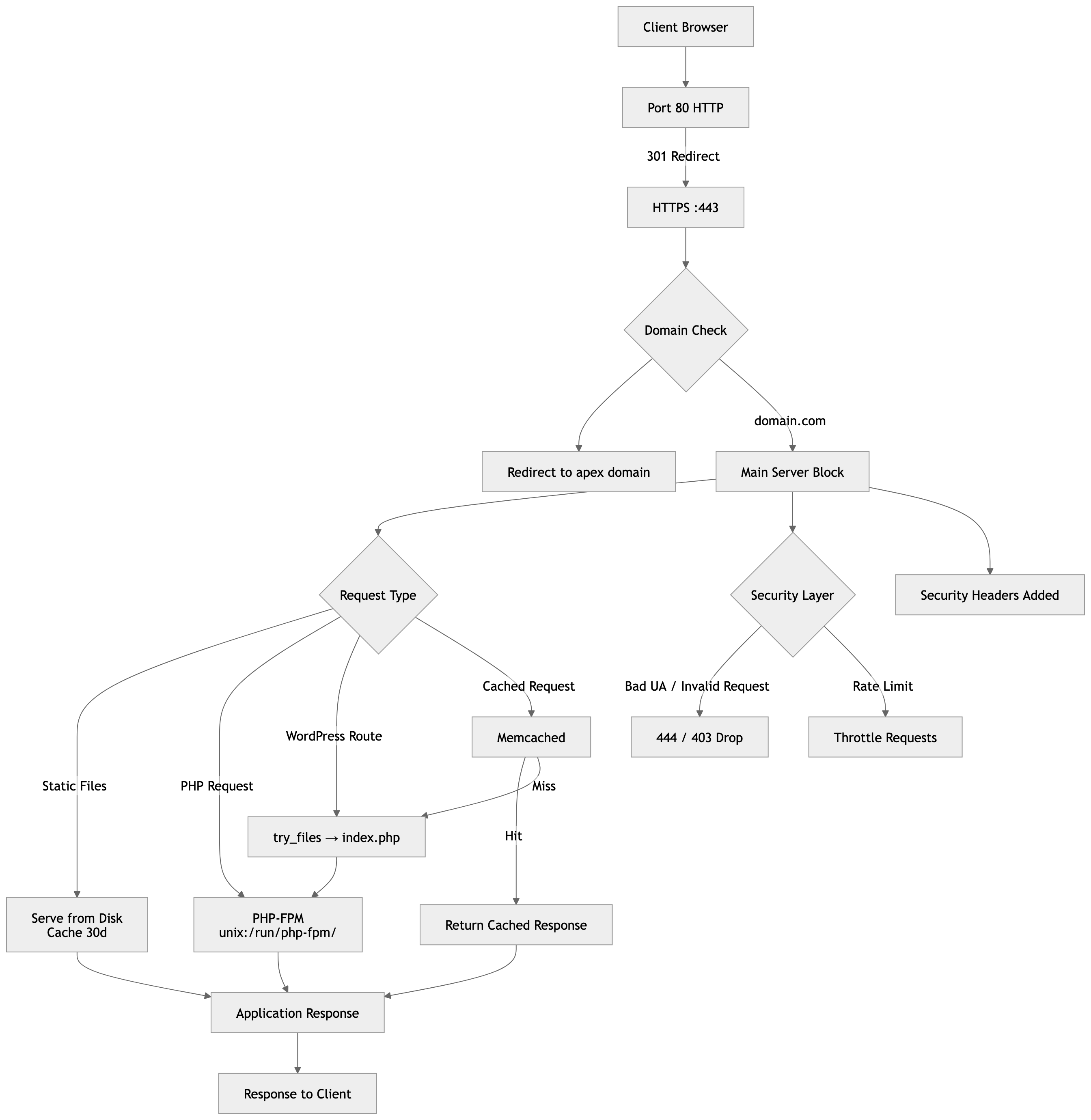
A simplified version:

🔷 What This Shows (Short Explanation)
-
Traffic flow
-
All HTTP traffic → redirected to HTTPS
-
www→ redirected to apex domain
-
-
Request routing
-
Static files served directly (fast path)
-
Dynamic requests go through:
-
Memcached (if enabled)
-
PHP-FPM (fallback)
-
-
-
Security layers
-
Bad bots dropped early
-
Rate limiting applied
-
Request validation enforced
-
-
Performance
-
Caching (browser + memcached)
-
Optimised TCP + gzip
-
Reduced logging noise
-
Let's Encrypt and certbot
CHANGE LOG
We no longer use /var/www/letsencrypt or dummy.crt – please use the proper domain directories
If a mobile phone uses www.domain.com you have to install -d domain.com -d www.domain.com
Let’s Encrypt – use of certbot command
You would previously have installed the cerbot and let’s encrypt package to Linux.
In these examples I use mydomain.com.
You need to register an account (email address) with the proposed certificate, and test with a –dry-run. If we make invalid requests to Let’s Encrypt, which uses the “ACME” method, we can be locked out for seven days if we forget to use –dry-run.
The certbot command is the program we use. There are many other systems available, but we use this one. We previously installed certbot with the pip system. (– and only pip –)
Here is the command we use – please use your own domain name: if you do not have acme.conf called in nginx.conf, use the actual website root, e.g. /var/www/html, then after installing, put acme.conf in the nginx.conf file, and edit /ets/letsencrypt/renewal/domain.com.conf (or whatever it is called) to map to /var/www/letsencrypt. Then restart nginx.
/usr/bin/certbot certonly --non-interactive --agree-tos -m ME@GMAIL.COM -d MYDOMAIN.COM --webroot -w /var/www/letsencrypt --dry-run
--> This is the output we expect, where XXXXXXX was my own email address. It does not matter where this is run from.
[root@openec2.com: /etc/nginx]# /usr/bin/certbot certonly --non-interactive --agree-tos -m XXXXXXXXXX@gmail.com -d mydomain.com.com --webroot -w /var/www/mydomain.com --dry-run
Saving debug log to /var/log/letsencrypt/letsencrypt.log
Account registered.
Simulating a certificate request for mydomain.com
The dry run was successful.
[root@openec2.com: /etc/nginx]#
-->
If you wish to delete the account or the domain certificate, please see the certbot --help command. e.g. certbot delete -d mydomain.com, or certbot unregister for the account.
If you have multiple domains on the same account, do not delete the account.
<--
Now install the live certificate, create the true nginx.conf file, check the contents of /etc/letsencrypt, and test a renewal.
We will then provide the renewal script and crontab entry.
Note: our systems no longer use Postfix for internal email alerts. We use an EC2 Instance IAM Attached Role and restricted least-use permission policies, integrated with the AWS-SDK software (no aws credential keys).
Use the same certbot command you did above without the –dry-run. My example sows /var/www/letsencrypt but if your dry-run used the domain directory do not change it when issuing the live command.
-->
Do the above command without the --dry-run.
e.g. /usr/bin/certbot certonly --non-interactive --agree-tos -m XXXXXXXXXXXX@gmail.com -d mydomain.com --webroot -w /var/www/mydomain.com
Here is the output:
Saving debug log to /var/log/letsencrypt/letsencrypt.log
Account registered.
Requesting a certificate for mydomain.com.com
Successfully received certificate.
Certificate is saved at: /etc/letsencrypt/live/mydomain.com/fullchain.pem
Key is saved at:         /etc/letsencrypt/live/mydomain.com/privkey.pem
This certificate expires on 2026-04-26.
These files will be updated when the certificate renews.
Certbot has set up a scheduled task to automatically renew this certificate in the background.
- - - - - - - - - - - - - - - - - - - - - - - - - - - - - - - - - - - - - - - -
If you like Certbot, please consider supporting our work by:
 * Donating to ISRG / Let's Encrypt:   https://letsencrypt.org/donate
 * Donating to EFF:                    https://eff.org/donate-le
- - - - - - - - - - - - - - - - - - - - - - - - - - - - - - - - - - - - - - - -
<--
cd /etc/letsencrypt/live
ls
README  mydomain.com
cd ..
cd renewal
cat mydomain.com.conf
# renew_before_expiry = 30 days
version = 2.6.0
archive_dir = /etc/letsencrypt/archive/mydomain.com
cert = /etc/letsencrypt/live/mydomain.com/cert.pem
privkey = /etc/letsencrypt/live/mydomain.com/privkey.pem
chain = /etc/letsencrypt/live/mydomain.com/chain.pem
fullchain = /etc/letsencrypt/live/mydomain.com/fullchain.pem
# Options used in the renewal process
[renewalparams]
account = e514472e5575a9f0e1b96327fe18afaf
authenticator = webroot
webroot_path = /var/www/mydomain.com,
server = https://acme-v02.api.letsencrypt.org/directory
key_type = ecdsa
[[webroot_map]]
mydomain.com = /var/www/letsencrypt.   --> this may be empty
--> Now verify the certificate:
/usr/bin/openssl x509 -noout -dates -in /etc/letsencrypt/live/mydomain.com/cert.pem
notBefore=Jan 26 23:33:00 2026 GMT
notAfter=Apr 26 23:32:59 2026 GMT
You can test various files are protected. For example:
curl -I https://mydomain.com/
HTTP/2 200

--> or specific files such as wp-config.php or .env and so on.
Note: if using somewhat legacy use of www.domain.com in your URL’s, you have to create a www certificate as well. Even though nginx redirects www, it won;t work without the certificate.
You would need certbot ….. -d mydomain.com -d www.mydomain.com …..
And don’t forget to remove any AAA DNS records. You must test certbot renew –dry-run.
SSL Renewal Script
Let’s Encrypt has always been tricky. You must test a renewal dry run, so that you have confidence in the crontab shell script, which I set to run every five nights (at present while renewals are 90 days).
We will show these scripts, and a handy ssl script that alerts you to any expiring certificates. These scripts are based on use of the AWS-SDK (not included in this particular article).
-->
You will need to have previously configured emails to work with your SES verififed domain(s) and email addresses, and tested.
Use your own names below. We have a "smoke" test php script to help. Use lowercase - I have used, e.g. MYDOMAIN.COM to help see where the changes are needed.
AI can help with the policy permissions you need for your attached IAM Role.
Note: we use the reload_AWS.sh script after renewals as nginx has to be restarted.
<--

cd /home/ec2-user

vi cert_dryrun_AWS.sh

#!/bin/bash
# =========================================================
# cert_dryrun.sh — SAFE Certbot dry-run wrapper using AWS SES
# =========================================================

set -euo pipefail

# -------------------------
# Configuration
# -------------------------
CERTBOT="/opt/certbot/bin/certbot"
LOGFILE="/var/log/certbot-dryrun.log"
RELOAD_SCRIPT="/home/ec2-user/reload_AWS.sh"
AWS_REGION="us-west-2"

# --- Optional manual overrides ---
HOSTNAME_OVERRIDE="MYDOMAIN.COM"
MAIL_FROM_OVERRIDE="ALERTS@MYDOMAIN.COM"
MAIL_TO_OVERRIDE="ME@GMAIL.COM"

# --- Defaults if overrides not set ---
HOSTNAME="${HOSTNAME_OVERRIDE:-$(hostname -s)}"
MAIL_FROM="${MAIL_FROM_OVERRIDE:-ALERTS@${HOSTNAME}}"
MAIL_TO="${MAIL_TO_OVERRIDE:-ME@GMAIL.COM}"

# -------------------------
# Logging to both terminal and log file
# -------------------------
exec > >(tee "$LOGFILE") 2>&1

echo "================================================="
echo "Certbot dry-run started on $HOSTNAME at $(date)"

# -------------------------
# Deploy hook for nginx reload (dry-run: just log)
# -------------------------
DEPLOY_HOOK_SCRIPT="$(mktemp)"
chmod +x "$DEPLOY_HOOK_SCRIPT"

cat > "$DEPLOY_HOOK_SCRIPT" <<'EOF'
#!/bin/sh
# Dry-run: do NOT reload services, just log
echo "Dry-run deploy hook called. No reload performed."
EOF


# -------------------------
# Run dry-run renewal
# -------------------------
if $CERTBOT renew --staging --dry-run -v --deploy-hook "$DEPLOY_HOOK_SCRIPT"; then
    echo "Certbot dry-run completed successfully"
else
    echo "ERROR: Certbot dry-run failed"

    # -------------------------
    # Email failure via SES API (IAM Role)
    # -------------------------
    RAW_MAIL="$(mktemp)"

    {
        echo "From: $MAIL_FROM"
        echo "To: $MAIL_TO"
        echo "Subject: SSL Certbot dry-run FAILURE on $HOSTNAME"
        echo "Content-Type: text/plain; charset=UTF-8"
        echo
        echo "Certbot dry-run failed on host: $HOSTNAME"
        echo
        echo "Timestamp: $(date)"
        echo
        echo "Log excerpt (last 50 lines):"
        tail -n 50 "$LOGFILE"
    } > "$RAW_MAIL"

    # Send email via SES using the EC2 instance role
    aws ses send-raw-email \
        --region "$AWS_REGION" \
        --raw-message Data="$(base64 -w 0 "$RAW_MAIL")"

    rm -f "$RAW_MAIL" "$DEPLOY_HOOK_SCRIPT"
    exit 1
fi

# -------------------------
# Cleanup
# -------------------------
rm -f "$DEPLOY_HOOK_SCRIPT"
echo "Certbot dry-run finished at $(date)"
exit 0

[save and exit]

chmod 777 cert_dryrun_AWS.sh; chown root:ec2-user cert_dryrun_AWS.sh

./cert_dryrun_AWS.sh

--> Here is the reload_AWS.sh script:

vi reload_AWS.sh

#!/bin/bash
# reload.sh - Safe reload of services + swap check + email alerts using AWS SES
# Usage: ./reload.sh [dry-run]

DRYRUN=$1                 # "dry-run" mode if set
RESTART_ALLOWED=yes       # set to "no" if full restart.sh should not be run
SWAP_THRESHOLD=500        # MB swap used before optional restart
MARIADB_LOG="/var/log/mariadb/mariadb.log"
ALERT_DIR="/var/tmp/reload-alerts"
FROM_EMAIL="alerts@shaw-au.net"   # restricted SES sender
TO_EMAIL="shawnet.au@gmail.com"
LOCKFILE="/var/tmp/reload.lock"

# -------------------------
# Global service names
# -------------------------
MARIADB_SVC="mariadb"
PHP_SVC="php-fpm"        # could be php8.4-fpm, php8.1-fpm, etc. if Apache2 or Debian
CACHE_SVC="memcached"
WEB_SVC="nginx"          # could be apache2

# If you were not using memcached, use an edited version of nginx.conf (not recommended) and remove CACHE_SVC from the list below
SERVICES=("$PHP_SVC" "$MARIADB_SVC" "$CACHE_SVC" "$WEB_SVC")

mkdir -p "$ALERT_DIR"

# -------------------------
# Helper Functions
# -------------------------
run_cmd() {
    if [[ "$DRYRUN" == "dry-run" ]]; then
        echo "[DRY-RUN] $*"
    else
        eval "$@"
    fi
}

send_email_once() {
    local key="$1"
    local subject="$2"
    local body="$3"
    local file="$ALERT_DIR/$key"

    TODAY=$(date +%F)
    if [[ ! -f "$file" ]] || [[ "$(cat $file)" != "$TODAY" ]]; then
        if [[ "$DRYRUN" != "dry-run" ]]; then
            RAW_MAIL="/tmp/reload_email_$key.txt"

            {
                echo "From: $FROM_EMAIL"
                echo "To: $TO_EMAIL"
                echo "Subject: $subject"
                echo "Content-Type: text/plain; charset=UTF-8"
                echo
                echo -e "$body"
                echo
                echo "Timestamp: $(date)"
            } > "$RAW_MAIL"

            aws ses send-raw-email \
                --region us-west-2 \
                --raw-message Data="$(base64 -w 0 "$RAW_MAIL")"

            rm -f "$RAW_MAIL"
            echo "$TODAY" > "$file"
        else
            echo "[DRY-RUN] Would send email: $subject"
        fi
    else
        echo "[INFO] Email for '$key' already sent today; skipping."
    fi
}

check_service() {
    local svc="$1"
    systemctl is-active --quiet "$svc"
}

# -------------------------
# Prevent concurrent runs
# -------------------------
exec 9>"$LOCKFILE"
flock -n 9 || { echo "Reload already running. Exiting."; exit 0; }

RELOADS_OCCURRED=0
EMAIL_BODY=""

# -------------------------
# Reload / Start Services
# -------------------------
for svc in "${SERVICES[@]}"; do
    if check_service "$svc"; then
        run_cmd "sudo systemctl reload $svc >/dev/null 2>&1"
    else
        run_cmd "sudo systemctl start $svc"
        RELOADS_OCCURRED=1
        EMAIL_BODY+="Service $svc was DOWN and has been started/reloaded.\n"
        # Immediate PHP-FPM alert if down
        if [[ "$svc" == "$PHP_SVC" ]]; then
            send_email_once "php_down" "ALERT: PHP-FPM DOWN" "PHP-FPM ($PHP_SVC) was down and has been started/reloaded on $(hostname) at $(date)."
        fi
    fi
done

# -------------------------
# Swap Refresh
# -------------------------
MEM_FREE=$(free -m | awk '/Mem:/ {print $4}')
SWAP_USED=$(free -m | awk '/Swap:/ {print $3}')

if (( MEM_FREE < SWAP_USED )); then
    echo "[WARN] Not enough RAM to write swap back. Swap refresh skipped."
else
    run_cmd "sudo swapoff -a && sleep 1 && sudo swapon -a"
fi

# -------------------------
# Check swap threshold
# -------------------------
if (( SWAP_USED >= SWAP_THRESHOLD )); then
    BODY="Swap usage is high: ${SWAP_USED}MB used (threshold ${SWAP_THRESHOLD}MB).\n"
    BODY+="Top of MariaDB log:\n$(head -20 $MARIADB_LOG 2>/dev/null)"
    send_email_once "swap_high" "ALERT: High Swap Usage" "$BODY"

    if [[ "$RESTART_ALLOWED" == "yes" ]]; then
        run_cmd "/home/ec2-user/restart.sh"
    fi
fi

# -------------------------
# Daily summary email if reloads occurred
# -------------------------
if (( RELOADS_OCCURRED == 1 )); then
    send_email_once "reload_summary" "reload_AWS.sh Summary - Services Reloaded" "$EMAIL_BODY"
fi

# -------------------------
# Output memory + swap stats
# -------------------------
echo "Memory"
free -m

echo "reload_AWS.sh run complete at $(date)"

# Release lock
flock -u 9
exit 0
The email alerts are meant ot provide only one per day if there is an issue.
Here is the certbot renewal script for crontab:
cd /home/ec2-user

vi cert_renewal_AWS.sh

#!/bin/bash
# =========================================================
# cert_renew.sh — SAFE Certbot renewal wrapper using AWS SES
# =========================================================

set -euo pipefail

# -------------------------
# Configuration
# -------------------------
CERTBOT="/opt/certbot/bin/certbot"
LOGFILE="/var/log/certbot-renew.log"
RELOAD_SCRIPT="/home/ec2-user/reload_AWS.sh"

# --- Optional manual overrides ---
HOSTNAME_OVERRIDE="MYDOMAIN.COM"            # e.g., "myserver-prod"
MAIL_FROM_OVERRIDE="ALERTS@MYDOMAIN.COM"    # from-address restricted in SES
MAIL_TO_OVERRIDE="ME@GMAIL.COM"    # recipient email

# --- Defaults if overrides not set ---
HOSTNAME="${HOSTNAME_OVERRIDE:-$(hostname -s)}"
MAIL_FROM="${MAIL_FROM_OVERRIDE:-ALERTS@${HOSTNAME}}"
MAIL_TO="${MAIL_TO_OVERRIDE:-ME@GMAIL.COM}"

# -------------------------
# Logging
# -------------------------
exec >>"$LOGFILE" 2>&1
echo "================================================="
echo "Certbot renewal run on $HOSTNAME at $(date)"

# -------------------------
# Deploy hook for nginx reload
# -------------------------
# This hook will run once IF any certificate is renewed
DEPLOY_HOOK_SCRIPT="$(mktemp)"
chmod +x "$DEPLOY_HOOK_SCRIPT"

cat > "$DEPLOY_HOOK_SCRIPT" <<'EOF'
#!/bin/sh
# Only runs if >=1 certificate renewed
if [ -x "/home/ec2-user/reload_AWS.sh" ]; then
    echo "Reloading services via reload_AWS.sh"
    /home/ec2-user/reload_AWS.sh
else
    echo "Reload script not found or not executable"
fi
EOF

# -------------------------
# Run renewal
# -------------------------
if $CERTBOT renew --quiet --deploy-hook "$DEPLOY_HOOK_SCRIPT"; then
    echo "Certbot renew completed successfully"
else
    echo "ERROR: Certbot renewal failed"

    # -------------------------
    # Email failure via AWS SES
    # -------------------------
    RAW_MAIL="/tmp/certbot_failure_email.txt"

    {
        echo "From: $MAIL_FROM"
        echo "To: $MAIL_TO"
        echo "Subject: SSL Certbot renewal FAILURE on $HOSTNAME"
        echo "Content-Type: text/plain; charset=UTF-8"
        echo
        echo "Certbot renewal failed on host: $HOSTNAME"
        echo
        echo "Timestamp: $(date)"
        echo
        echo "Log excerpt (last 50 lines):"
        tail -n 50 "$LOGFILE"
    } > "$RAW_MAIL"

    # Send email via SES using the EC2 instance role
    aws ses send-raw-email \
        --region us-west-2 \
        --raw-message Data="$(base64 -w 0 "$RAW_MAIL")"

    # Cleanup
    rm -f "$RAW_MAIL" "$DEPLOY_HOOK_SCRIPT"
    exit 1
fi

# -------------------------
# Cleanup
# -------------------------
rm -f "$DEPLOY_HOOK_SCRIPT"
echo "Certbot run finished at $(date)"
exit 0
Here is a crontab entry: (The script executes very quickly using its silent mode)
# once every five nights:
0 2 */5 * * /home/ec2-user/cert_renewal_AWS.sh >/dev/null 2>&1
Here is a helpful smoke test script:
cd /home/ec2-user

vi smoketest.sh

#!/bin/bash
# ses_smoke_test.sh - Verify EC2 IAM role SES sending
# Usage: ./ses_smoke_test.sh [recipient_email]

# -------------------------
# CONFIG
# -------------------------
MAIL_FROM="ALERTS@MYDOMAIN.COM"        # SES-verified sender
MAIL_TO="${1:-ME@GMAIL.COM"  # Default to your verified recipient
REGION="us-west-2"                    # Change if your SES region is different

# -------------------------
# Compose raw test email
# -------------------------
RAW_MAIL="$(mktemp)"

{
    echo "From: $MAIL_FROM"
    echo "To: $MAIL_TO"
    echo "Subject: SES Smoke Test Email"
    echo "Content-Type: text/plain; charset=UTF-8"
    echo
    echo "Hello!"
    echo
    echo "This is a SES smoke test from EC2 using IAM role credentials."
    echo "Timestamp: $(date)"
} > "$RAW_MAIL"

# -------------------------
# Send email via SES
# -------------------------
echo "Sending test email to $MAIL_TO..."
aws ses send-raw-email \
    --region "$REGION" \
    --raw-message Data="$(base64 -w 0 "$RAW_MAIL")"
if [ $? -eq 0 ]; then
    echo "✅ SES smoke test email sent successfully!"
else
    echo "❌ SES smoke test failed. Check IAM role permissions and SES region."
fi

# -------------------------
# Cleanup
# -------------------------
rm -f "$RAW_MAIL"

[save and exit - chmod 777 and rootLec2-user]

./smoketest.sh
CHANGE NOTES
No use of dummy.crt/.key certificates and /var/www/letsencrypt – legacy. Remove IP6 AAA DNS records. Use of -d www.domain.com if needed.
The initial nginx.conf example will not work while the .htpasswd stanzas are enabled. Get phpmyadmin working first before working through the second layer of security for .htpasswd. Also note, a fix is needed in security.conf to remove /22 from the IP addressing of xxx.xxx.xxx.xxx/22.
We now use certbot —— -d domain.com -d www.domain.com ——- so that mobile phones using www are not given a security warning. We add another A records in the DNS for www.domain.com (rather than a CNAME) and if the registrar allows it, an issuewild for letsencrypt.org alongside the existing issue record.